
What TidyCentral does, area by area.
Every clip below is the real product on demo data for a sample company, Northwind Provisions. Click a line to read what it does for the office.
Orders and shipping
Every Shopify order, from the moment it lands to the carrier pickup.
-
Orders arrive from Shopify on their own
New orders show up on the board with the customer, the items and the shipping method already filled in. When an order ships, the fulfillment and tracking number go back to Shopify, so the customer gets the usual notification and nobody copies numbers between tabs.
-
Each order goes to the right warehouse and box
Routing rules decide which warehouse ships an order and which box type it gets. The office sets the rules once. The picker never has to guess.
-
Pick lists on paper or on TidyPick
Print a pick list for a wave of orders, or send it to a picker's phone. TidyPick walks them through it bin by bin and marks each item off as it is picked.
-
A pack station that buys the label
The packer brings up the order, confirms the box, and the label prints. Labels come from FedEx direct, or from UPS, USPS and other carriers through EasyPost.
-
Bulk shipping for the long days
Select a batch of ready orders and buy all their labels in one step. The queue clears in minutes instead of one order at a time.
-
Local pickup on a schedule
Customers who collect in person get a pickup time. The floor sees who is coming and when, and marks the order handed over.
-
Refunds that land on Shopify
File the refund on the order and it is pushed to Shopify, where the customer's money actually moves. There is no second system to open.
Inventory
What is on the shelf, where it is, and why the count changed.
-
Every product has a bin and a location
Each SKU is assigned to bins per warehouse, so pick lists send people to the right shelf and receiving knows where things go. Each warehouse keeps its own locations.
-
Adjustments always say why
A count change is recorded with a reason: damaged, found, miscount. At month end the report shows where stock went instead of a mystery number.
-
Crates for stock that moves together
Group units into a crate and move or count the crate as one thing. Useful for cases and pallets that travel together.
-
Purchase orders and receiving
Raise a purchase order to a supplier, then receive against it when the truck arrives. A short delivery shows up as the gap between ordered and received.
-
Stock and replenishment reports
See what is low against what is selling and what is already on order. Reorder before a pick list runs into an empty bin.
-
Cycle counts
Count a few bins a day instead of closing the warehouse for a full count. Differences are posted as adjustments, with a reason.
Support Desk
Your customer mailbox, with the customer's orders already next to each email.
-
Works with the mailbox you already have
Connect Microsoft 365 or Google Workspace. Customers keep writing to the same address. Your team reads it in TidyCentral instead of the inbox.
-
Every email is a ticket linked to the order
The ticket shows the customer's recent Shopify orders, what the warehouse did with them and the tracking. The agent answers from facts, not from a second tab.
-
Refund or reship from the ticket
A refund filed on the ticket is pushed to Shopify and the warehouse queue updates. A reship puts the item back on the pick list. Nobody re enters anything.
-
Templates and a knowledge base
Common replies live as templates. Policies and product facts live in a knowledge base the whole team reads from, so answers match.
-
AI drafted replies, with the AI assistant module
The AI reads the ticket and the order and drafts a reply for the agent to check and send. It also sorts tickets by what the customer wants, so the urgent ones surface first.
-
Analytics on volume and response
How many tickets came in, how fast they were answered and what they were about. Enough to staff the desk and to spot a product problem early.
Supplier pickups and TidyRoute
Collecting from your suppliers, with the office watching the van.
-
Plan the route
Build the route from your supplier list: who to visit, in what order, what is expected at each stop. The driver gets it on the phone.
-
The driver runs it from TidyRoute
Each stop is checked in with GPS, so the office can see where the van is and what is left. No phone calls to ask.
-
Stop notes for shorts and problems
The driver records what was picked up and what was short, at the stop. The office knows before the van is back.
-
Invoice scanning at the stop
The driver photographs the supplier's invoice on the phone. It is attached to the stop, with the right supplier and date.
-
The week's invoices in one zip
At the end of the week the office downloads every scanned invoice in one file, ready for bookkeeping.
Team
Who is working, what they are working on, and how the floor talks.
-
Clock in at a kiosk or with a badge
A tablet on the wall runs the kiosk. People tap a badge or enter a PIN, and the punch is on the timesheet before they reach their station.
-
Clock in from a phone or a computer when a manager allows it
A per employee switch lets someone punch from their own signed in phone or computer. Useful for the supervisor who starts the day away from the building. Everyone else stays on the kiosk.
-
Time off and timesheets
Requests, approvals and the resulting timesheet in one place. The timesheet is what payroll works from, so hours are not typed in twice.
-
TidyChat for the floor
Team chat on a phone, for people who are not at a desk. An announcement reaches everyone. A question reaches the right person.
-
Tasks and a company calendar
Assign a task and see it done. The calendar holds what the whole company needs to know about: deliveries, inspections, days off.
-
SOPs and cleaning checklists
Procedures live in an SOP library. Cleaning checklists run on the floor kiosks, so the record of what was cleaned and when is kept without a clipboard.
-
Team scoring
A score per person for the period, with the measures behind it. Reviews start from numbers instead of memory.
Admin
Who can do what, which integrations are on, and what the business made.
-
Roles with sensible defaults
Admin, operations manager, warehouse manager, warehouse employee, support agent, driver and viewer come ready made. Change a permission once and it applies to everyone in the role.
-
One warehouse or several
Each warehouse has its own bins, pick lists and routing. The office sees them side by side on one board.
-
Integrations on one tab
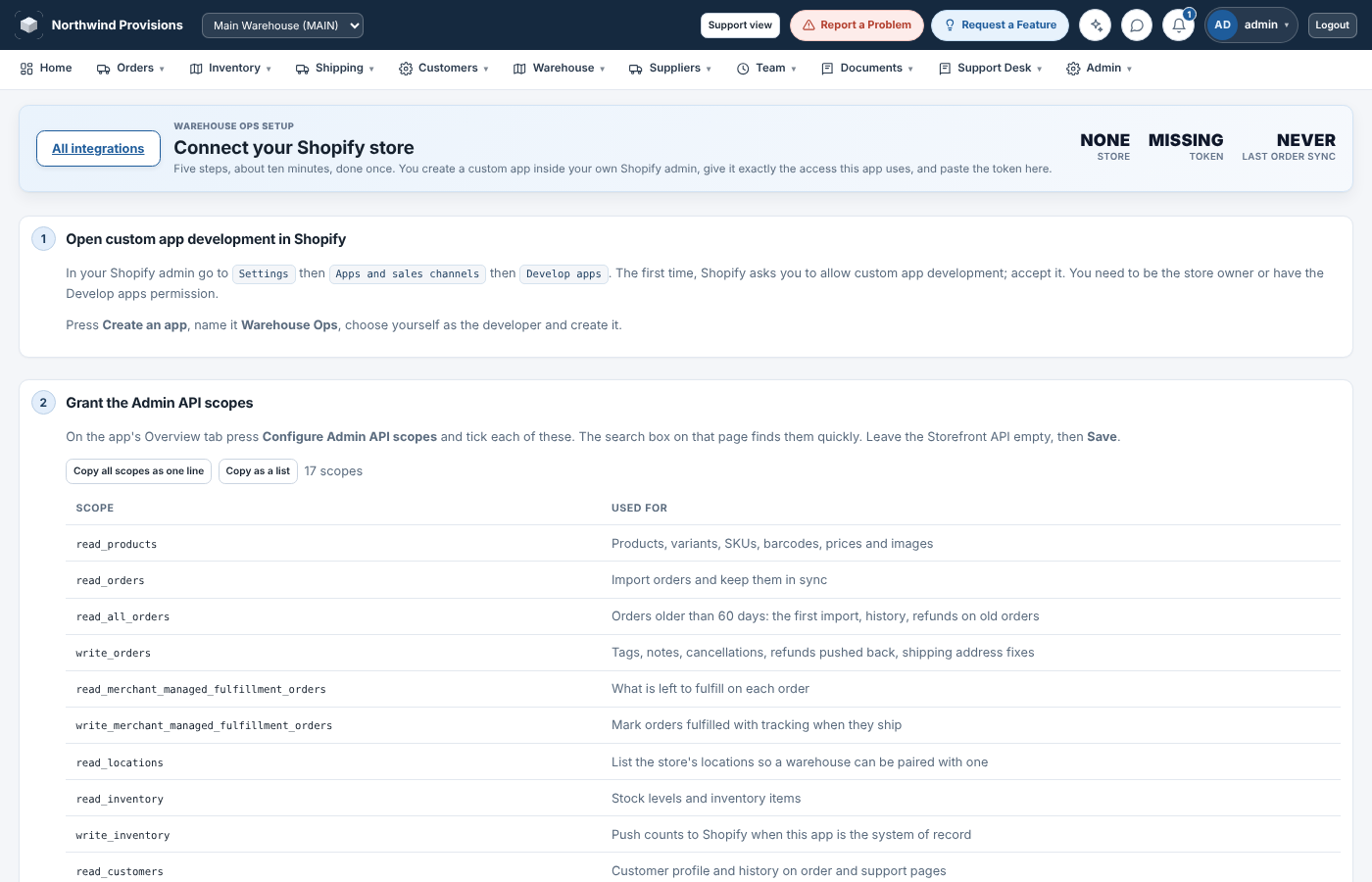
Shopify, FedEx or EasyPost, the mailbox, Recharge, QuickBooks and Twilio are connected from Settings. Shopify has a guided page of its own.
-
Feature switches and licensing
Turn a module on the month you need it. Your license decides what is available. The switches decide what the team sees.
-
Reports on profitability, costs and AI usage
Profitability for the period, what the company spent, and what the AI assistant used. The numbers an owner asks for at the end of the week.
Four installable apps from one install.
Your team opens your install's address on a phone and adds the app to the home screen.
TidyCentral
The full app on a desktop or a tablet: orders, inventory, Support Desk, team and admin.
TidyPick
Picking on a phone. Open the pick list and work through it bin by bin.
TidyRoute
The driver's app. The supplier pickup route with GPS check in, stop notes and invoice scanning.
TidyChat
Team chat on a phone, for people on the floor rather than at a desk.
Connecting Shopify is a guided page, not a document.
The setup page walks you through creating the Shopify custom app and pasting its credentials. Then it confirms the sync is live.
Want to see it with your orders?
A demo takes about half an hour. We use your order mix and your warehouse layout as the example.